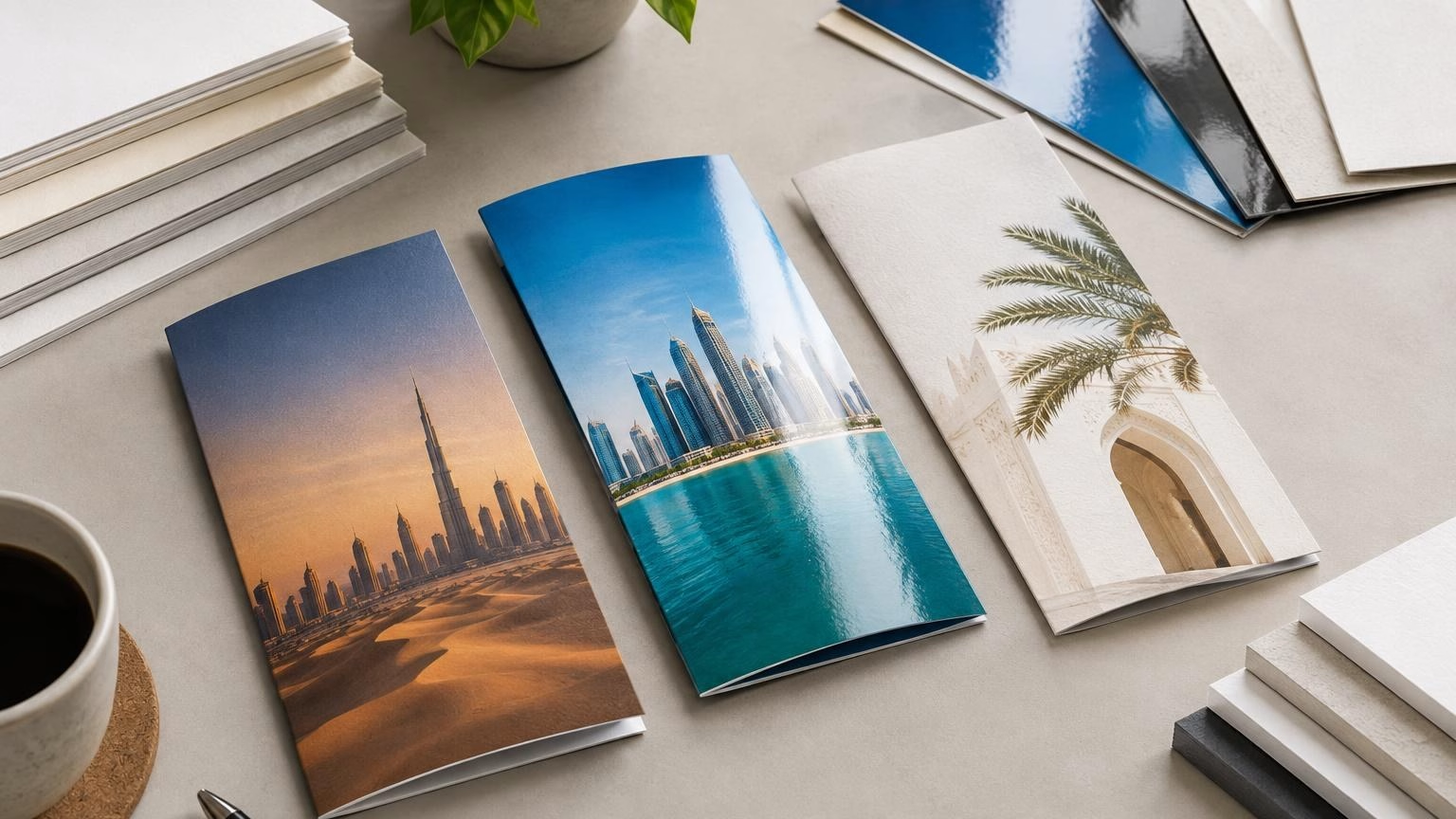
For brochure paper and finish in the UAE, start with the brochure’s purpose: how it will be distributed, how often readers will handle it, and what impression the brand should make. Choose paper weight for the required feel and format, then select a finish that supports the design and remains comfortable to read., Brochure Paper Weight and Finish in the UAE
A heavier sheet is not automatically the better choice. A multi-page brochure needs to open and handle well, while a single-sheet handout may benefit from a more substantial feel. Matte, gloss and uncoated surfaces each create a different visual and tactile result; the right option depends on the content and use case.
Quick answer: match the paper to the job
- For a brochure people will carry or keep: consider a paper weight that feels sturdy without making the format awkward to handle.
- For a multi-page brochure: consider the combined thickness and weight of all pages, not just the cover.
- For image-led design: compare how matte and gloss finishes affect colour, contrast and reflections.
- For a natural or writable surface: ask whether an uncoated option suits your design and intended use.
- Before approving: confirm available paper and finish choices for the format, and check a proof or sample where possible.
Paper weights and finishes vary between printers and product formats. The guidance below explains how to make a selection; it does not confirm a specific paper stock or finish is available from IWPrinting. Check the options for your project before placing an order.
What paper weight means for a brochure
Paper weight is commonly described in grams per square metre, written as GSM. As a general guide, a higher GSM indicates a heavier sheet, but the final brochure’s feel also depends on the paper type, size, number of pages and binding or folding format.
Think about weight by component. The inside pages of a multi-page brochure may need to remain flexible enough to turn and fold, while a cover can be selected to feel more substantial. For a single-sheet leaflet or folded handout, the same sheet forms both the cover and the reading surface, so balance stiffness with ease of folding and distribution.
| Brochure use |
Weight consideration |
What to check |
| Multi-page company profile |
Choose a page stock that is comfortable to turn; consider a heavier cover if appropriate. |
Total thickness, page count and how the brochure opens. |
| Single-sheet handout |
Balance a firm feel with practical folding and carrying. |
Finished size, fold lines and whether readers need to write on it. |
| Event or exhibition brochure |
Consider repeated handling and how the brochure will be carried. |
Distribution method, storage and the campaign’s expected duration. |
| Short-lived promotion |
A lighter construction may be practical when the information is temporary. |
Whether the content will remain accurate for the full distribution period. |
This table is a selection aid, not a specification. Ask the printer to confirm the paper weights offered for your format and whether the cover and inside pages can use different stocks.
How to choose a brochure finish
A finish changes how a brochure looks and feels, and how it behaves under lighting. Compare finishes against your actual content rather than choosing by appearance alone.
Gloss
Gloss has a shiny surface that can make colour and photographs appear more vivid. It may suit image-led brochures, product showcases or designs with strong visual contrast. However, reflections can make some text harder to read under bright lights. Consider the lighting where people will read or display the brochure.
Matte
Matte has a less reflective appearance and can suit text-heavy layouts or brands seeking a restrained look. It may make a brochure easier to view under some lighting conditions, but the colour impression can differ from gloss. Review the finish alongside your photographs and brand colours before approving it.
Uncoated
Uncoated paper has a more natural, paper-like surface. It can work well for understated designs and may be useful when readers are expected to write on the page. Check how fine text, large areas of colour and photographic images reproduce on the specific paper being considered.
For another perspective on how surface treatments affect printed collateral, see IWPrinting’s guide to choosing business card finishes. Brochure requirements differ, so confirm brochure-specific options separately.
Choose for the audience and campaign setting
Brochure paper and finish should support what readers need to do. A product catalogue that people will refer to more than once has different handling needs from a handout for a short event or a leaflet distributed with a purchase.
- For customer-facing sales material: prioritise legibility, clear product photography and a finish that suits the brand.
- For event distribution: consider whether brochures will be carried in bags, placed on a counter or handed out directly.
- For internal or training material: check whether readers need to annotate pages and whether the content may be updated.
- For bilingual campaigns: allow enough space for both English and Arabic, and check text direction, font rendering and page balance.
- For material used in different settings: consider bright indoor lighting, repeated handling and storage. No paper finish should be assumed to be weatherproof or suitable for prolonged outdoor exposure unless confirmed.
In Dubai and across the UAE, a campaign may reach people through several locations and distribution channels. Plan for those real conditions rather than selecting a paper solely because it feels premium in isolation.
Artwork and proof checks before printing
Paper choice cannot compensate for artwork that is difficult to read or not prepared to the final format. Confirm the printer’s file requirements before export, as setup requirements can vary.
- Set the artwork to the confirmed finished size and include any requested bleed and safe margins.
- Check page order, fold positions and panel orientation for folded brochures.
- Review image quality at the intended print size, particularly for product photographs and small details.
- Proofread names, contact details, dates, prices and calls to action.
- For English-Arabic layouts, check both language versions with a fluent reviewer and verify right-to-left text direction.
- Review colours and small text on a proof or sample when available; screens do not always show the printed result exactly.
If you are also preparing other campaign materials, IWPrinting has a separate guide on preparing signage artwork. Use the brochure printer’s own file instructions for your brochure, since artwork requirements may differ by product.
A practical way to make the final choice
- Define the job. Write down the brochure’s audience, purpose, distribution method and expected period of use.
- Confirm the format. Decide whether it is a single sheet, folded handout or multi-page brochure, and confirm the finished dimensions.
- Separate cover and inside needs. For a multi-page format, ask whether different paper weights can be used for the cover and inner pages.
- Compare finishes using your design. Check text readability, photographs, colour appearance and reflections—not just a blank sheet.
- Plan the quantity. Estimate distribution needs by location or campaign activity. Allow for updates if dates, offers or contact information may change.
- Confirm the order details. Ask the printer to confirm available paper options, finish, format, quantity, artwork requirements and any relevant production details before approving.
Make the decision using the brochure as a complete object. A thick sheet may feel impressive but be impractical for a large multi-page piece; a shiny finish may lift photographs but create distracting reflections; an uncoated surface may suit note-taking but not every image-led design.
Frequently asked questions
What paper weight is suitable for a brochure?
It depends on the brochure format and how it will be used. Lighter paper can suit a multi-page brochure distributed in quantity, while heavier paper can give a cover or single-sheet handout a sturdier feel. These are general guidelines, not a guarantee of available options. Confirm the paper weights offered for your chosen format before ordering.
Should I choose matte or gloss for a brochure?
Choose based on the brochure’s content and brand style. Gloss can make photographs and strong colours look more vivid, while matte generally gives a less reflective, more restrained appearance. If the brochure includes substantial text or will be read under bright lighting, consider whether glare could affect readability. Ask to review available finishes before deciding.
Is uncoated paper a good choice for brochures?
Uncoated paper can suit a natural, understated look and may be preferable when readers need to write notes on the brochure. Its appearance and feel differ from coated finishes, so check how your chosen colours, images and text will reproduce. Suitability depends on the design, paper option and intended use.
What should I check before submitting brochure artwork?
Check the final size, page order, image resolution, spelling, colours and any bleed or safe-area requirements supplied by the printer. For bilingual English and Arabic brochures, proofread both languages and check Arabic reading direction and font rendering. Request clarification on file setup before finalising the artwork.
How should I plan brochure quantities for a UAE campaign?
Estimate how many brochures each campaign location or distribution activity needs, then consider whether the content will remain current throughout the campaign. Avoid ordering more than you can store or distribute, especially if dates, prices or contact details may change. Confirm the final quantity and production details with your printer before approval.
Discuss your brochure requirements
Before choosing a paper weight or finish, share your brochure format, intended audience, design and distribution plan with IWPrinting. Contact the team to confirm the options available for your project and the artwork details to prepare.
Related IWPrinting products and guides