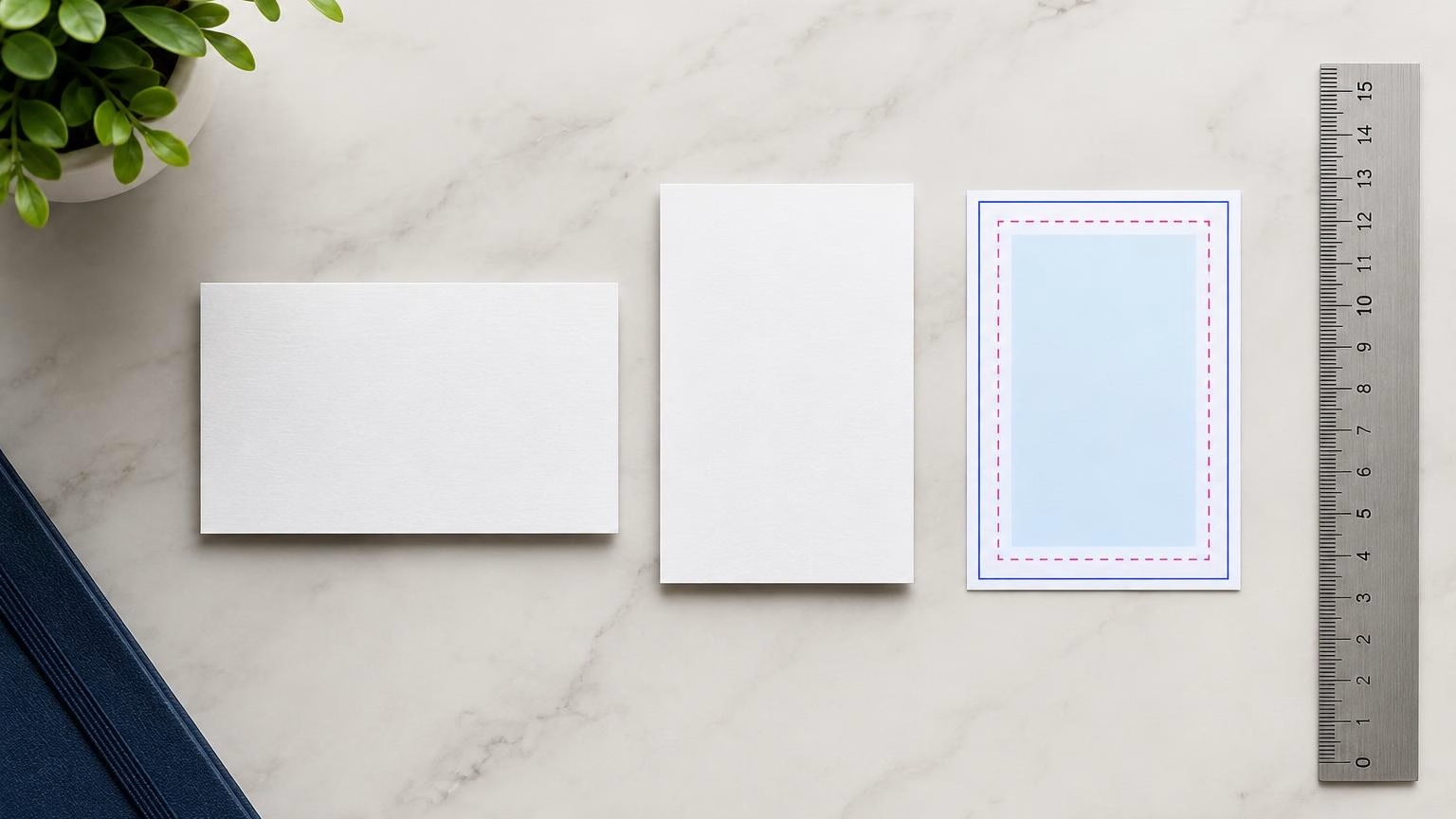
The commonly used business card size in the UAE is 90 × 50 mm. Another familiar option is 85 × 55 mm. Neither format is a universal requirement, so confirm the finished size with your printer before preparing artwork.
Both dimensions can be printed in landscape or portrait orientation. For clean trimming, keep important details inside a safe area and extend any edge-to-edge background beyond the cut line as bleed. The printer’s artwork template should take precedence over general guidance.
Quick answer: common UAE business card dimensions
- 90 × 50 mm: A widely used UAE format with a broad landscape layout.
- 85 × 55 mm: A slightly narrower, taller alternative.
- Landscape: The longer side runs horizontally.
- Portrait: The longer side runs vertically.
- Safe area: Keep essential content approximately 3–5 mm inside the trim edge, unless your printer’s template says otherwise.
- Bleed: Extend backgrounds or images past the trim line according to the supplied print specifications.
These are practical design references, not a claim that one size is required across the UAE. For business card printing in Dubai, confirm the available format and artwork requirements before finalising a design.
Compare the common business card sizes
The right size is the finished card measurement after trimming. Choose dimensions before laying out the design, because changing the aspect ratio later can force text, logos or white space to be rearranged.
| Finished size |
Typical layout |
What to consider |
| 90 × 50 mm |
Landscape or portrait |
A broad layout can accommodate a name, job title and several contact details. Portrait orientation uses the same dimensions turned vertically. |
| 85 × 55 mm |
Landscape or portrait |
A familiar alternative with a slightly different proportion. Check that the logo and text remain balanced within the available space. |
Dimensions alone do not determine how a card will feel or perform. Paper choice and finish affect the result, so consider how the card will be handled, stored and presented. For a closer look at those decisions, see how to choose business card paper stock in the UAE.
Choose landscape or portrait orientation
Orientation describes which way the card is held. A landscape card is wider than it is tall; a portrait card is taller than it is wide. The best option is the one that supports your information and brand without making the text feel crowded.
When landscape works well
Landscape is a straightforward choice for many business identities. It provides a horizontal line for a logo and name, with contact details arranged below or beside them. It can also work well when your logo is wider than it is tall.
When portrait may suit your design
Portrait orientation can complement a vertical logo, a compact brand mark or a deliberate stacked layout. Allow enough room for names and contact information to remain readable. A distinctive orientation is useful only if people can still find the details quickly.
Before choosing, make a simple layout using the actual card dimensions. Check the logo, name, job title, phone number, email address and website together. If the card also includes Arabic and English, test both languages in the final layout rather than assuming the text will fit after translation.
Understand bleed, trim and safe margins
Trim is the final cut that gives the card its finished size. Bleed is extra artwork beyond that cut line, while the safe area is the space inside the cut where essential details should stay. These areas solve different artwork problems.
- Trim line: The intended edge of the finished card.
- Bleed area: Extra background colour or image beyond the trim, where required, to help avoid a thin unprinted edge after cutting.
- Safe area: An inset zone for important text, logos and other details that should not sit close to the cut.
As a practical starting point, place essential content 3–5 mm inside the trim. This is general artwork guidance, not a guaranteed printer specification. Bleed requirements can vary, so use the template or instructions provided for your order. Do not mistake the bleed area for extra usable space for contact details.
Prepare artwork for UAE business cards
Good artwork makes the card easier to read and helps keep the design consistent with your business identity. Review the content at its actual printed size, not only enlarged on a screen.
- Check contact details: Confirm names, job titles, email addresses, websites and phone numbers before submitting the file. For UAE contacts, check that any international dialling code is correct.
- Plan bilingual content: If you need Arabic and English, allow space for both scripts and check alignment, reading order and font legibility.
- Keep key content clear of the edge: Apply the safe-area guidance and use the printer’s template where available.
- Use QR codes deliberately: If you add one, link it to a useful destination and test that it scans at the intended printed size. Read more in this guide to QR code business cards in the UAE.
- Check the final proof: Review spelling, layout, orientation and finished dimensions before approving the artwork.
How to choose the right size for your business
Start with the way the card will be used, then select the dimensions and layout that make the information easy to understand. A networking card may need several contact details, while a card used as a simple brand reminder may need less content.
- List the information that must appear. Include only details that are useful to the recipient.
- Choose the format. Compare 90 × 50 mm and 85 × 55 mm, and confirm which finished size is available for your order.
- Select orientation. Match landscape or portrait to the logo and content rather than choosing on appearance alone.
- Consider paper and finish. Think about the impression you want and how often the card may be handled. Ask which options are available for the chosen product.
- Prepare and check the artwork. Use the correct dimensions, respect the safe area, add bleed where requested and proofread every detail.
- Plan quantities around use. Estimate how the cards will be distributed, such as at meetings, events or customer visits. Confirm order details directly before proceeding.
For design and product options, visit IWPrinting’s business card printing page. Confirm the chosen dimensions and artwork requirements before sending files to print.
Frequently asked questions
What is the standard business card size in the UAE?
A commonly used UAE business card size is 90 × 50 mm. The 85 × 55 mm format is another familiar option. There is no single size that every business must use, so confirm the finished dimensions with your printer before designing or ordering.
Is 90 × 50 mm the same as 85 × 55 mm?
No. Both are rectangular formats, but their proportions differ: 90 × 50 mm is wider and shorter, while 85 × 55 mm is slightly narrower and taller. Choose based on your layout, branding and preference, then prepare the artwork to match the selected finished size.
How much safe margin should a business card have?
Keep important text, logos and contact details at least 3–5 mm inside the trim edge as a practical starting point. This safe area helps protect essential content from being cut too close. Follow the printer’s template if it specifies a different margin.
What is the difference between bleed and safe margin?
Bleed is artwork that extends beyond the intended cut edge so the printed design can reach the edge after trimming. The safe margin is the inner area where important content should remain. Use the dimensions and bleed requirements supplied for your chosen card format.
Should I choose landscape or portrait business cards?
Landscape is a familiar choice for standard contact details and wide logos. Portrait can suit a vertical logo or a more distinctive layout, but it gives you a narrower writing area. Choose the orientation that keeps names, roles and contact information easy to read.
Plan your business card artwork
Choose the finished dimensions first, then build the layout around your brand, contact details and preferred orientation. If you are preparing cards for a Dubai or UAE business, contact IWPrinting to discuss the available business card options and confirm the artwork specifications before ordering.